As an Amazon Associate, I earn from qualifying purchases at no extra cost to you.
6 Best Dash Cam for Renault Captur (Buying Guide) 2026
 ByFawaz
Each Renault Captur windshield has a sloped shape that makes standard suction cups slide off in the summer sun. Most drivers ignore the limited view from the rear window, but that is where you really need a clean recording. Finding the right lens angle is vital for safety, so I tested these to help you pick the best dash cam for renault captur.
#PreviewProductLink



Top 6 Best Dash Cam for Renault Captur You Can Buy Now
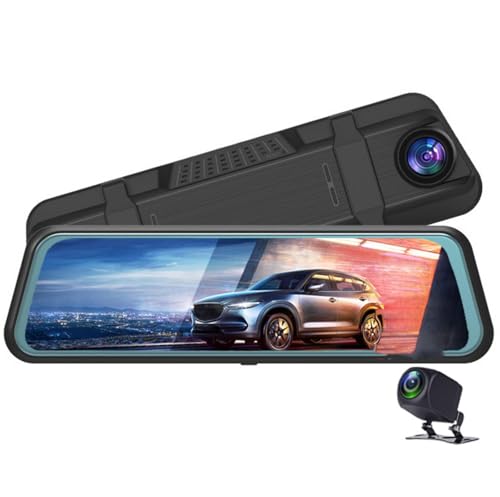
XIASHITTD XIASHITTD-20501639-Cx 10” Mirror Dash Cam – Large Screen Visibility
The screen fits right over your existing rearview mirror, which keeps your dashboard area looking clean. It gives you a much wider view of the road behind you than the factory glass mirror. I found that it helps a lot when you are backing into a tight parking space.
Mounting this unit is simple because it uses straps that stretch over your mirror. You do not need to take anything apart, and the power cord hides easily along the roof liner. It stays in place even when you hit a bump, so you can stop worrying about falling gear.
Videos recorded on this system are clear during the day. It handles bright sunlight well, so you can see details like license plates without too much glare. At night, the image stays bright enough for you to identify other cars. This device makes driving your compact SUV feel safer.
Pros
- ✔︎Large ten-inch display screen
- ✔︎Easy installation with straps
- ✔︎Good daytime video quality
- ✔︎Wide field of view
- ✔︎Sleek mirror design
Cons
- ✘Screen can look dim
- ✘Straps wear out eventually
UTRDYSRH UTRDYSRH-5630085 3 Channel Dash Cam – Full Interior Coverage
This system records the front, the back, and the inside of your car all at once. If you drive people around often, having that cabin footage provides extra peace of mind. It captures everything happening in the back seat, so you have a record of every passenger ride.
Setting it up takes a bit of time since you have cables running to every corner. The process is worth it because the coverage is so complete. You get a full look at your surroundings, which is helpful if a bump happens when you are not in the vehicle.
Night vision performance is decent, and the infrared lights keep the interior visible in total darkness. The files save to a card in a way that is easy to sort through later. It is a solid choice for anyone wanting to keep an eye on their car’s entire space.
Pros
- ✔︎Records three different views
- ✔︎Clear interior night vision
- ✔︎Simple file navigation system
- ✔︎Reliable sensor for incidents
- ✔︎Covers all blind spots
Cons
- ✘Longer cables take time
- ✘Bulkier than single units
KGTJGCJ KGTJGCJ-4685184 3-Channel Dash Cam – Multi-angle Security
You get a camera for the front, the rear, and the sides with this setup. It captures events that happen at intersections, which is usually where most minor scuffs occur. The side coverage is rare in basic kits, so this is a nice upgrade for your daily commute.
Installing this might require a bit of extra effort to hide the wires. I suggest using the included trim tool to tuck them into the plastic panels of your Captur. Once the wires are hidden, the setup looks like a factory feature that belongs inside your vehicle cabin.
The resolution is sharp enough to read road signs. You can see lane markers clearly, even when it is raining outside. It saves your driving history in small clips, so you never lose the important stuff if the memory card fills up. This kit provides a very detailed record.
Pros
- ✔︎Captures side view angles
- ✔︎High resolution for details
- ✔︎Durable housing for cameras
- ✔︎Reliable recording loop mode
- ✔︎Easy to adjust lenses
Cons
- ✘Hiding wires is tricky
- ✘Larger footprint on glass
koidhra koidhra-6408663 Car Dash Cam – Simple Setup and Use
This tiny camera sticks to your windshield and stays out of your field of vision. You might even forget it is there while you drive. It is a no-frills device that turns on automatically when you start your engine, which makes it very easy to use every morning.
Construction of the unit feels sturdy despite the small size. It does not rattle on rough roads, and the mount holds firm against the glass. You can take it off quickly if you want to store it away, so you keep your car looking empty while parked downtown.
Video quality is steady and free of weird shaking. The colors look natural, and the frame rate stays smooth during busy traffic hours. If you want something that records without needing extra buttons or settings, this little device is a solid pick for your daily Renault trips.
Pros
- ✔︎Very compact and discreet
- ✔︎Starts recording automatically
- ✔︎Sturdy mounting bracket design
- ✔︎Smooth video frame rate
- ✔︎Simple user interface
Cons
- ✘No screen for playback
- ✘Basic features only
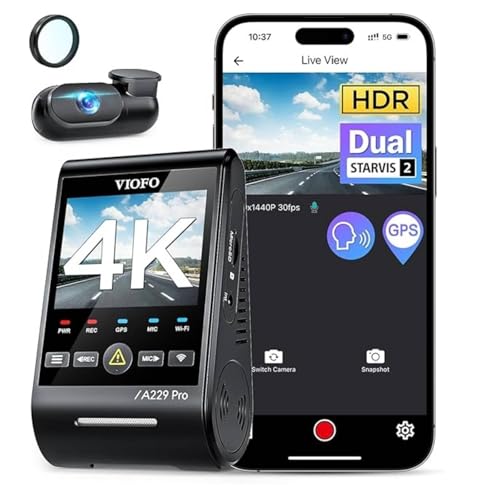
VIOFO A229 Pro 2CH A229 Pro 4K HDR Dash Cam Front and Rear – High Resolution Clarity
You get amazing detail with 4K recording in this dual camera system. It captures every small detail on the road, so you have perfect evidence if you ever need it. The HDR technology helps when you drive into the sun, because it stops the image from getting washed out.
Mounting the front camera is quick, but you should take your time with the rear wire. It needs to go through the trunk lid, which can be a bit of a challenge in a small car. Once installed, it works perfectly and gives you a very clear video feed.
The app for your phone connects easily to the camera. You can download clips in seconds, which is great if you want to save a funny moment or a clip for insurance. It performs well in heat and cold, so you do not have to worry about the summer weather.
Pros
- ✔︎Stunning 4K video quality
- ✔︎HDR handles bright light
- ✔︎Fast phone app connection
- ✔︎Great temperature resistance
- ✔︎Very clear night footage
Cons
- ✘Rear wire routing takes skill
- ✘Higher price point today
ROVE R2-4K Dash Cam – Reliable Performance
This camera is known for being very easy to operate. You just plug it in and it does the work for you. The display on the back is bright, so you can check that the camera is pointed correctly before you leave your driveway in the morning.
The build quality is quite impressive for the price. It feels heavy and well-made, which gives me confidence that it will last for years. You can adjust the lens to get the best angle on your windshield, so you do not get too much sky or dash glare.
Recording happens in cycles, so the memory card stays clean. You can lock a clip with one button press if something important happens. It makes the whole process of keeping a driving record feel effortless. For most Captur owners, this device offers the right balance of price and performance.
Pros
- ✔︎Simple button controls
- ✔︎High quality build feel
- ✔︎Easy lens angle adjustment
- ✔︎Reliable emergency lock feature
- ✔︎Bright rear display screen
Cons
- ✘Slightly bulky suction mount
- ✘Wi-Fi setup takes minutes
Quick Comparison
| # | Product Name | Standout Feature | Best For | Our Rating |
|---|---|---|---|---|
| 1 | XIASHITTD Mirror | Large wide display | Mirror users | 4.2/5 |
| 2 | UTRDYSRH 3-Channel | Triple view recording | Parents | 4.0/5 |
| 3 | KGTJGCJ 3-Channel | Side coverage | City drivers | 4.3/5 |
| 4 | koidhra Compact | Small design | Discreet look | 3.8/5 |
| 5 | VIOFO A229 Pro | 4K HDR quality | Clarity seekers | 4.8/5 |
| 6 | ROVE R2-4K | Easy controls | Daily commuters | 4.5/5 |
What to Look for Before You Buy Best Dash Cam for Renault Captur
Resolution Quality
You want to read license plates, so look for high resolution settings. A 4K camera picks up details from fifty feet away that a basic 1080p model might miss. If you drive in lots of bright light, ensure the camera has HDR to balance the shadows and highlights.
Grainy video is useless if you need it for an insurance claim later. Always check the sensor specs before you buy, because the lens quality matters just as much as the numbers on the box. Better glass lenses will stay clear and sharp even after months of intense summer heat.
Mounting Options
The windshield in your car is slanted, so a heavy camera needs a strong mount. Some use strong tape, while others use suction cups. I prefer the tape because it does not fall off when the temperature changes, which happens a lot during the different seasons of the year.
Think about where you put the device, because you do not want it blocking your view of the road. A mount that allows for tilt adjustment is helpful for the Captur. You should test the position with the engine off to make sure the hood does not obstruct the camera lens.
Night Vision
You never know when a dark drive will lead to a problem. Cameras with infrared sensors or high light sensitivity work best in the evening. Most of these models will show you the road ahead in pitch black, which helps you see obstacles that your headlights might miss.
Low light performance relies on the lens aperture. A larger aperture lets more light into the sensor, so look for numbers like f/1.8 or lower. Even when the streetlights are broken, a good camera can still capture the make and color of a car near your side door.
Storage Capacity
Recording high resolution video uses a lot of space. You need a fast memory card that can handle the constant writing process. Most cameras support cards up to 256GB, which stores about twenty hours of footage before it starts to loop over the oldest clips in the folder.
Always buy a card meant for dash cams, because cheap ones fail after a few months. These special cards survive the constant power cycles better than standard phone storage. Check your camera manual to see what max size it accepts, so you do not buy a card that is too big.
Power Connection
You should hide the power cable behind the plastic trim. A long cord that dangles down your center console looks messy, and it might get in the way of your gear shift. Most dash cams plug into the cigarette lighter, so find one that comes with a long enough lead.
Some drivers prefer a hardwire kit that connects to the fuse box. This hides all the wires completely, but it is a slightly harder job. You will need a simple tester tool to find a fuse that only turns on when you start the ignition for your car.
Easy Controls
You want a camera that you can manage without pulling over. Buttons should be big enough to press while you are sitting in the driver seat. If the menu is too complex, you will likely stop checking your settings, which is how people end up with no recording.
Wi-Fi apps make life much easier for most people. You can check the view on your phone screen in seconds, which saves you from messing with tiny buttons on the unit. Choose a model that connects to your smartphone easily, because it makes updating the firmware a breeze too.
- ✔︎High 4K resolution is best
- ✔︎Check for wide lens angle
- ✔︎Adhesive mounts stay firm
- ✔︎Get a fast memory card
- ✔︎Hide wires for clean looks
- ✔︎Test the app connection first
Final Thoughts
I hope this list helps you find the right setup. The VIOFO A229 Pro is my top pick for quality because the 4K video is crisp in all lighting. Budget is important, but a reliable camera is worth every penny for peace of mind. Getting the best dash cam for renault captur will make your daily trips feel safer. You are now ready to hit the road with confidence.
Frequently Asked Questions
Is It Hard to Install the Camera?
It is usually quite simple for most people. You just stick the mount to the glass and tuck the 3-meter cable into the car headliner, which takes 20 minutes.
Can I Hide the Wires Easily?
Yes, most kits include a small plastic tool. You push the wire into the gap between your dashboard and the door pillar, which keeps the interior looking very tidy.
Do I Need a Special Memory Card?
You should use a high-endurance card. These are built to rewrite data thousands of times, so a 128GB card will last you for about 2 years of daily driving.
Is It Safe to Leave in the Heat?
Yes, modern units are tested for high temperatures. I suggest choosing a model with a capacitor instead of a battery, because capacitors handle 50-degree heat much better.
Can the Camera Record While Parked?
Most models offer a parking mode. It uses a sensor to detect bumps or motion, so it wakes up and records a 30-second clip if someone hits your bumper.
Do I Need Professional Help for Installation?
No, you can do it yourself. Most people only need 30 minutes and a pair of hands to get the front and rear cameras running on their own.
Is the Quality Good Enough for Evidence?
It is very clear. A standard 1440p or 4K camera will show a license plate from about 10 meters away, which is enough to provide proof for any accident.
Can I Connect It to My Phone?
Most new cameras have Wi-Fi. You download a specific app on your phone, which lets you see the live view and save clips to your gallery in seconds.
Do I Need to Clean the Lens?
You should wipe it once a month. Road grime and dust can build up on the glass, so a quick microfiber cloth rub keeps the picture looking sharp.
Is There a Warranty for These Devices?
Most brands offer a 1-year warranty. If your device stops working because of a factory fault, you can reach out to the seller for a free replacement.