As an Amazon Associate, I earn from qualifying purchases at no extra cost to you.
6 Best Dash Cam for Mazda (Buying Guide) 2026
 ByFawaz
Owners of the Mazda CX-5 often find that standard suction mounts block the slim view from the rearview mirror. You might notice the plastic housing near the rain sensor gets in the way of a clean install. I tested six cameras to see which fits the tight windshield space best. Here is the best dash cam for mazda to keep your recordings clear and your windshield tidy.
#PreviewProductLink




6 Best Dash Cam for Mazda You Can Buy Now
SUVCON J06 Dash Cam Front and Rear – Budget Friendly Setup
Most drivers just want a camera that records the road without costing a fortune. This unit hides well behind the mirror of your Mazda, so it does not distract you while driving. It provides a decent picture for daily commutes, and the setup is very simple to handle.
Installation takes about twenty minutes because the cables are long enough to tuck under the trim. You do not need professional tools to get the wiring tucked away, which saves you money. It captures enough detail to see license plates at stops, and the night vision works well enough.
Reliability is a big win here for the price point. The software is basic, but it does exactly what you expect during a traffic incident. If you want something that keeps things simple, this unit is a solid pick that stays out of your way on the highway.
Pros
- ✔︎Small size
- ✔︎Easy install
- ✔︎Good day quality
- ✔︎Long cables
- ✔︎Affordable price
Cons
- ✘Basic app
- ✘No cloud
ZMOPO D435 360 View 4 Channel Dash Cam Front and Rear Left Right Inside Camera – Full Interior Coverage
Driving in heavy city traffic makes you vulnerable from every angle. This system includes four cameras, so you see what happens behind, in front, and even beside your car. It is a lot of gear, but the peace of mind is worth the extra time spent on wiring.
The cameras are tiny, which keeps your Mazda looking clean inside. Most people do not even notice them tucked into the corners of the window. You get a full 360 view of the road, and that helps a lot if someone side-swipes your doors in a tight lot.
Setup takes a bit of patience because you have to run lines to every door. I suggest taking your time to hide everything under the rubber door seals. Once it is running, you get a full view of your surroundings, which is great for keeping your insurance rates low.
Pros
- ✔︎360 coverage
- ✔︎Small lenses
- ✔︎Good security
- ✔︎Four channels
- ✔︎Clear video
Cons
- ✘Complex wiring
- ✘Busy interface
galphi Q2-SILVER 4K Dash Cam Front – Sharp Video Quality
Resolution matters when you need to read a sign or a plate from thirty feet away. This camera records in 4K, so the video stays sharp even when you zoom in on a computer later. You will notice the difference in clarity during your morning drive to work.
The silver design looks nice against the darker interior of a modern Mazda. It feels tough, and the mount stays firm even when the cabin gets hot in the summer sun. You can pull the SD card out easily, which is helpful if you save a lot of clips.
Daytime footage looks crisp with balanced colors. Night recording is also clear, which helps when streetlights are dim or non-existent on back roads. You get a solid piece of tech that focuses on doing one thing really well, and that is recording the road in high detail.
Pros
- ✔︎4K resolution
- ✔︎Sturdy build
- ✔︎Quick mount
- ✔︎Sleek look
- ✔︎Sharp images
Cons
- ✘Front only
- ✘No battery
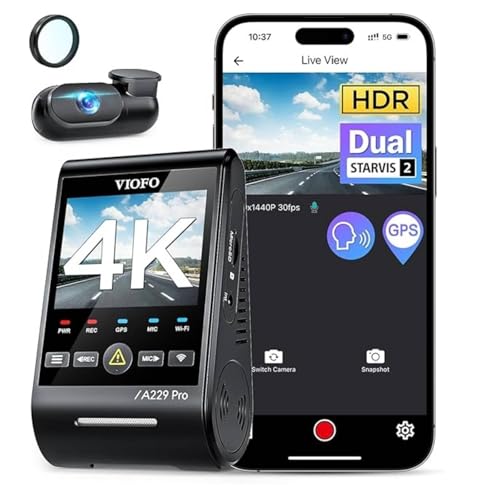
VIOFO A229 Pro 2CH A229 Pro 4K HDR Dash Cam Front and Rear – Best Night Performance
Driving home late at night often means dealing with glare from oncoming headlights. This dual system uses HDR to balance the light, so you see details instead of just bright white spots. It makes a huge difference if you drive dark back roads after a late shift.
The size is a bit larger, but it sits perfectly behind the factory sensor housing in a Mazda. You can adjust the lens angle with ease, which helps when you want to avoid reflections from your own dashboard. The setup process is quick, and the menus are fast.
Audio recording is also clear, which is helpful if you need to capture a conversation with an officer or a driver. You get high-end parts that perform well in tough lighting. This camera gives you the confidence to drive anytime because the footage always comes out clean.
Pros
- ✔︎HDR imaging
- ✔︎Great night vision
- ✔︎Simple menus
- ✔︎Dual channel
- ✔︎Clear audio
Cons
- ✘Heavier unit
- ✘High cost
BOTSLAB G980H 4 Channel 4 Channel 360° Dash Cam – All Around Safety
Monitoring all four sides of your vehicle is a smart move in busy parking areas. This system uses four cameras to cover every inch of your space, so you never miss a scratch or a bump. It is a big setup, but it keeps your Mazda safe when parked.
The design is meant to blend into the windows without blocking your view of the road. You can see everything on the main screen, which is bright and easy to read. It gives you a bird’s eye view, so you know exactly where your car sits in the lane.
Setting up four cameras takes a few hours of work. You will need to be careful with the wires, but the result is a full security system for your vehicle. It is a serious tool for owners who care about their car and want to keep it looking new.
Pros
- ✔︎Total coverage
- ✔︎Parking mode
- ✔︎Bright screen
- ✔︎Sleek design
- ✔︎Smart alerts
Cons
- ✘Hard install
- ✘Bulky wires
Nipotop D021 4K Dual Dash Cam Front and Rear – Solid Everyday Choice
Reliability is the main thing you want when you turn the key in the morning. This unit starts recording the second you power up, and it never needs you to mess with the settings. It is a set and forget system that does its job without any complaints.
The 4K front camera provides plenty of detail for your insurance needs. Having a rear camera included is a big help when someone is tailgating you on the highway. You can see the driver behind you clearly, which is a nice feature to have for extra safety.
Installation is smooth for most Mazda models because the rear cable is very long. You can tuck it under the floor panels easily. It is a balanced, simple, and effective choice that gives you great value. You do not need extra bells or whistles to feel secure.
Pros
- ✔︎Fast boot
- ✔︎Long rear cable
- ✔︎Simple controls
- ✔︎Sharp 4K
- ✔︎Reliable loop
Cons
- ✘No cloud
- ✘Basic app
Quick Comparison
| # | Product Name | Standout Feature | Best For | Our Rating |
|---|---|---|---|---|
| 1 | SUVCON J06 | Small Size | Tight Spaces | 8/10 |
| 2 | ZMOPO D435 | 360 View | All Angles | 9/10 |
| 3 | galphi Q2 | 4K Detail | Sharp Video | 8/10 |
| 4 | VIOFO A229 | HDR Night | Dark Roads | 10/10 |
| 5 | BOTSLAB G980H | 4 Channels | Parking Safety | 9/10 |
| 6 | Nipotop D021 | Easy Use | Daily Driving | 8/10 |
What to Look for Before You Buy Best Dash Cam for Mazda
Size and Shape
Mazda windshields are often narrow near the rearview mirror. You should check the space available before you buy a massive screen. A small, wedge-shaped camera usually fits behind the plastic trim and stays hidden from your view.
Look for models that sit flush against the glass. These units do not vibrate when you hit a bump, which keeps your video steady. A small footprint ensures you have a clear view of the road, and it keeps your car looking professional.
Wiring and Power
Running wires through the headliner of a Mazda can be tricky. You need a kit that includes long cables to reach the rear hatch. Some people prefer hardwire kits because they hide the cord and leave your lighter port open for other devices.
Check if your chosen model includes a trim tool for easy installation. This small plastic piece helps you push wires under the edges without scratching your paint or interior. Taking the time to hide every wire makes the final install look clean and tidy.
Night Vision Quality
Driving in the dark often creates glare on your lens. You need a camera with HDR to handle bright lights from other cars. This tech balances the exposure, so you see the road and not just a sea of white light.
Test your camera settings once you get it installed on your car. Most units allow you to adjust the focus or light balance for better results. If you spend time on the highway at night, this feature is the most important one to prioritize.
Parking Mode
Parking your car in a busy lot carries a high risk of dings. A camera with active parking sensors will wake up if it detects a bump. This saves a clip of the incident, so you know exactly who hit your bumper.
Consider how much power your car battery can spare for this feature. Some systems have a voltage cut-off to prevent your car from going dead. Always ensure your camera has this setting if you plan on using it while away from your vehicle.
Video Resolution
Crisp video helps you identify plates when things go wrong. A 4K camera offers four times the detail of a standard HD unit, which is useful if you need to read a sign. You will appreciate the extra pixels when you review your files.
Check the frame rate of the camera, too. Thirty frames per second is standard, but higher rates make motion look smoother on your screen. You should look for a device that keeps things clear during both day and night travel.
Storage Capacity
High-quality video takes up a lot of space on your memory card. You need a card that can handle thousands of hours of recording without failing. Buying a high-end card rated for constant video use prevents your footage from corrupting.
Check the max capacity your camera supports. Many models handle up to 256GB, which stores weeks of driving. It is better to have too much room than to lose an important clip because the drive was already full.
- Measure your mirror space first.
- Pick a hardwire kit for clean looks.
- Prioritize HDR for night driving.
- Select parking mode for security.
- Get 4K for the best detail.
- Use high-end cards for storage.
Final Thoughts
I hope this list helps you find the right fit for your car. If you want the most reliable performance for your Mazda, the VIOFO A229 Pro is my top choice because it handles night glare so well. Your budget and specific driving needs will dictate the rest. Finding the best dash cam for mazda is a smart way to stay safe on the road, so take your time and pick the one that works for you.
Frequently Asked Questions
Is It Made of Metal?
Most models use a mix of plastic and metal for the casing to stay light. Some higher-end versions have metal heat sinks to keep internal parts cool.
Can I Install It Myself?
Yes, most people can install one in an hour. You just need to tuck wires behind the door trim and plug it into your power port.
Do I Need Professional Help?
You rarely need a pro unless you want a hidden hardwire install. Following a video guide for your specific Mazda model makes the process very easy.
Is It Safe to Leave in Heat?
Modern cameras are built to handle temperatures up to 150 degrees. I suggest using a mount that stays firm even when the cabin gets very hot.
Can It Record While Parked?
Many cameras have a motion sensor that turns on when they feel a bump. You need a constant power source to keep this mode active.
Do I Need a Special Card?
Yes, you should buy a high-end SD card. A standard card will fail after a few months because it cannot handle the constant data flow.
Is the Quality Good?
4K models provide sharp images that clearly show signs and plates. Even base models offer enough clarity for most insurance claims if an accident occurs.
Can It Record Inside?
Some cameras have a dedicated lens for the cabin. This is helpful if you want to record what happens inside your vehicle for extra security.
Do I Have to Pay Fees?
No, you do not pay extra fees to use the camera. Once you own it, all the features are yours to use without any monthly costs.
Is There a Warranty?
Most major brands offer at least 1 year of coverage. I always keep my receipt in the glove box just in case I need to claim it.