As an Amazon Associate, I earn from qualifying purchases at no extra cost to you.
6 Best Dash Cam for Subaru Solterra (Buying Guide) 2026
 ByFawaz
No factory dash cam sits behind that large Subaru eyesight mirror, so you usually end up with a dangling cord blocking your view. Most people ignore the rain sensors until they try to mount a suction cup there. I checked which cameras fit the tight space near the cabin sensors, and these are the best dash cam for subaru solterra options to keep your view clear.
#PreviewProductLink




Top 6 Best Dash Cam for Subaru Solterra You Can Buy Now
FITCAMX HD2-6512 Front 4K+Rear 1080P Dash Cam Adapts – Clean Factory Look
The shape of this camera mimics your plastic sensor housing, so it looks like part of the car. You plug it into the existing rain sensor wires, which saves you from pulling apart the headliner. It sits flush against the glass, and it never obstructs your vision while driving.
Setting it up takes about twenty minutes if you have small hands for the tight clips. The app connection is quick, but you should download your clips to your phone right away. I like how it hides behind the mirror, because it does not draw any unwanted attention at night.
Night footage captures street signs clearly, although some glare might appear from the bright city lights. The rear camera wires run through the trim easily, so you avoid a messy cabin setup. This unit stays cool during long summer drives, and the casing does not rattle on bumpy country roads.
Pros
- ✔︎Matches Subaru interior plastic
- ✔︎Connects to existing wiring
- ✔︎Sits high on the windshield
- ✔︎Includes clear rear camera
- ✔︎App is simple to use
Cons
- ✘Limited angle adjustment
- ✘Setup requires small hands
mangoal 4K Front & Rear 1080P Dash Cam – Simple Budget Option
This camera sits on a standard mount, so you can stick it anywhere on your windshield. It records at 4K resolution, which helps when you need to read a license plate at a red light. The screen is bright, but you can turn it off during your night drives.
Connecting this to your power outlet takes a few minutes, because the cord is long enough to tuck under the floor mats. I found the buttons easy to press, which matters when you want to lock a video file quickly. It works fine during a standard morning commute.
Heavy heat can make the suction cup lose its grip, so you should clean the glass with alcohol before mounting. The menus are logical, and you do not need a manual to change the recording settings. It provides peace of mind, because the loop recording starts up automatically.
Pros
- ✔︎Records in high resolution
- ✔︎Long power cable included
- ✔︎Buttons are easy to reach
- ✔︎Quick to install initially
- ✔︎Reliable loop recording
Cons
- ✘Suction cup needs cleaning
- ✘Screen can get bright
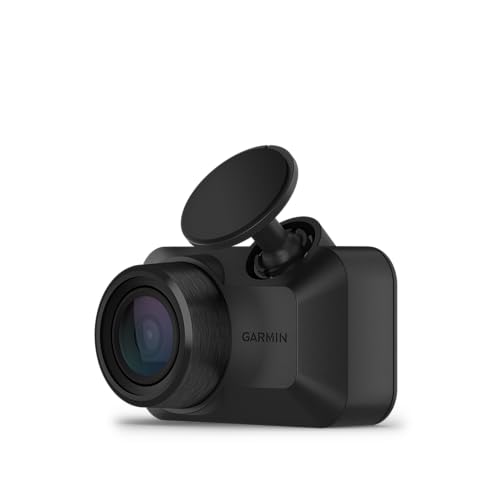
Garmin 010-02900-00 Dash Cam™ X110 – High Clarity Tech
Garmin makes a very small camera that hides easily behind the rearview mirror. You get 4K video quality, which captures fine details even when traffic moves fast. The voice control works well, so you can tell the camera to save a clip while keeping your hands on the wheel.
Parking mode needs a constant power connection, but it watches your car while you shop. The lens has a wide view, which covers both lanes on a busy highway. I think the magnetic mount is a good idea, because you can pop the device off for security reasons.
Small details like lens flares are kept to a minimum, and the colors look accurate even in low light. The internal battery is not meant for long recording, so you must leave it plugged in. It feels solid in your hand, and the build materials seem to last a while.
Pros
- ✔︎Voice control is helpful
- ✔︎Magnetic mount detaches fast
- ✔︎Wide view covers lanes
- ✔︎Very small physical size
- ✔︎Clear 4K video feed
Cons
- ✘Constant power needed
- ✘App sync takes time
VIOFO A329S 2CH A329S 4K 60FPS Dash Cam Front and Rear – Smooth Motion Capture
This camera records at sixty frames per second, so the video stays smooth when you drive over expansion joints. It captures motion better than standard cameras, because the fast frame rate reduces blur. You can mount it high up, which keeps it out of your direct line of sight.
Wiring the rear camera takes some patience, but the long cord reaches the back window easily. The heat sink keeps the internal processor cool, so it does not shut down on hot days. I noticed the files are quite large, so you should use a fast memory card.
Night vision is where this really shines, because the sensor pulls in enough light to show details in dark alleys. The menus allow you to customize almost every setting, so you can prioritize storage or quality. It feels like a tool for someone who wants the best image.
Pros
- ✔︎Smooth 60FPS video capture
- ✔︎Good heat management system
- ✔︎Advanced menu customization
- ✔︎Excellent night image quality
- ✔︎Durable sensor hardware
Cons
- ✘Large file sizes
- ✘Harder to install wiring
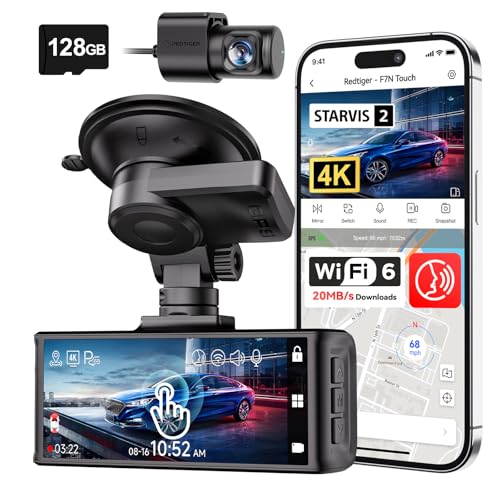
REDTIGER F7N TOUCH 4K STARVIS 2 Dashcam Front Rear – Large Touch Screen
You get a big touchscreen on the back of this unit, which makes changing settings simple. It shows both front and rear feeds, so you can check your blind spots while you park. The interface feels like a modern phone, and it responds to your touch right away.
Installing the camera is a straightforward task, but you need to hide the rear cable under the plastic door sills. I appreciate the large display, because it helps you align the lens perfectly after you mount it. It stays steady on the glass, even when you hit potholes.
Night images look bright because of the sensor tech, and the contrast stays balanced in tunnels. The power port stays firm, so you do not lose recording if you hit a bump. It is a good choice for someone who wants to see exactly what is being recorded.
Pros
- ✔︎Big easy touchscreen display
- ✔︎Simple phone-like interface
- ✔︎Clear night time sensor
- ✔︎Easy to align lens
- ✔︎Solid power connection
Cons
- ✘Screen takes up space
- ✘Cable management takes time
70mai T800E 4K Dash Cam Front and Rear Inside – All Around View
This system includes a cabin camera, which monitors the inside of your Subaru Solterra. It records passengers if you use your car for ride-sharing, which adds a layer of safety. The setup is larger than others, but it does everything you might need from a camera kit.
Installation involves three cameras, so give yourself an afternoon to run all the wires. I find the mobile app works well for viewing clips, and you can trim them before you share. It covers the inside, the front, and the back at the same time for safety.
The video quality remains high across all channels, so you catch every angle of a traffic incident. You should check your storage space often, because three cameras fill up a memory card very fast. It is a reliable choice for families who want to monitor the whole car.
Pros
- ✔︎Three camera coverage points
- ✔︎Perfect for ride-sharing
- ✔︎Reliable app for clips
- ✔︎High resolution on all
- ✔︎Solid safety features
Cons
- ✘Takes space on glass
- ✘Long setup time required
Quick Comparison
| # | Product Name | Standout Feature | Best For | Our Rating |
|---|---|---|---|---|
| 1 | FITCAMX HD2-6512 | Fits sensor housing | Minimalists | 9/10 |
| 2 | mangoal 4K | Low price tag | Budget buyers | 7/10 |
| 3 | Garmin X110 | Magnetic mount | Easy removal | 8/10 |
| 4 | VIOFO A329S | 60FPS frame rate | Smooth video | 9/10 |
| 5 | REDTIGER F7N | Large touchscreen | Easy controls | 8/10 |
| 6 | 70mai T800E | Interior coverage | Ride-sharing | 8/10 |
What to Look for Before You Buy Best Dash Cam for Subaru Solterra
Power Source
You should check if your camera uses a standard USB port or a specific hardwire kit. Hardwiring is better for parking modes, but it involves tapping into your fuse box. If you prefer a simpler setup, you can use the accessory outlet in your car for power.
Some cameras pull power through the rain sensor harness, which keeps your cabin looking clean. I suggest you decide if you want the camera running while the car is off. This protects you in parking lots, but it requires a more permanent connection to your battery.
Mounting Style
The mount determines how much of the road you actually see. Suction cups are easy to move, but they often fall off during extreme weather changes. Adhesive tape provides a stronger hold, but it is much harder to remove if you want to swap vehicles later.
Look for a mount that allows you to tilt the lens after you stick it to the glass. You want the camera pointed at the center of the road, not the sky or the dashboard. A small mount hides behind the mirror, which keeps your view open and safe.
Resolution Quality
4K video is the new standard, and it helps you see small details like license plates. Lower resolutions often blur out numbers when you are driving over thirty miles per hour. You want a sensor that can handle high speeds and bright sunlight at once.
Check the frame rate, because sixty frames per second makes the image look much smoother. Standard thirty frames might look choppy during fast highway turns or sharp movements. A higher number helps the software freeze the action, which is vital when you review a traffic incident.
Night Vision Performance
Driving at night is when you need a camera the most. Cheap sensors often show nothing but darkness, which does not help your case after a crash. Look for a camera that uses a high-quality sensor to pull light from street lamps and your own headlights.
Some brands use special tech to keep the image from getting grainy in low light. I suggest watching a few sample videos taken at night before you buy. You want to see license plates clearly, even when there are no street lights on a dark country road.
Storage and Memory
Cameras save video in a loop, so you need a fast memory card to prevent errors. You should buy a high-endurance card, because constant writing wears out standard memory fast. A 128GB card holds many hours of video, which gives you room for long road trips.
The camera manages the loop, so it deletes the oldest files to make room for new ones. You do not need to worry about the storage filling up during your commute. Just remember to format the card every few months to keep the software running smooth.
App Connectivity
The phone app is how you view your footage without moving the card. You want an app that loads quickly, because waiting for a large file is frustrating. Simple interfaces allow you to trim a ten-second clip, which is all you need to save for an insurance report.
Check if the camera uses a local Wi-Fi signal to talk to your phone. This makes transferring a file fast, even when you are parked in a garage with no service. I like to test the sync feature before I finalize the installation inside my vehicle.
- ✔︎Choose a hardwire kit for parking safety.
- ✔︎Pick an adhesive mount for a steady image.
- ✔︎Buy a high-endurance card for long life.
- ✔︎Check for 60FPS to get smoother video.
- ✔︎Look for night sensor specs before buying.
- ✔︎Test the app to see if it syncs fast.
Final Thoughts
I hope this list helps you find a camera that fits your Subaru Solterra without blocking your vision. The VIOFO A329S is my top pick because the smooth 60FPS video captures everything clearly. Think about your budget, but prioritize image quality because it matters most when you need the footage later. Finding the best dash cam for subaru solterra is easier when you know what to look for. You can do this.
Frequently Asked Questions
Is It Hard to Install These on the Solterra?
Most are simple, but hiding wires takes about 45 minutes. You can tuck cables under the headliner to keep the cabin looking clean and organized for safety.
Can I Mount This Behind the Rearview Mirror?
Yes, most compact cameras fit well there. You should measure the space near your sensors first to ensure the camera lens has a clear view ahead.
Do I Need a Special Memory Card?
You should use a high-endurance microSD card. These cards handle constant recording better than standard ones, and a 128GB size lasts for many hours of driving.
Is It Legal to Have a Camera on the Windshield?
Rules vary by state, but most allow cameras as long as they stay out of your main line of sight. Keep it behind the mirror to be safe.
Do I Need to Remove the Camera in Hot Weather?
High-quality cameras handle 120-degree heat just fine. If you live in a very hot area, try to park in the shade to help the device last longer.
Can I Connect It to My Phone?
Most modern dash cams use a dedicated app. You connect your phone to the camera’s local Wi-Fi signal to view your clips in about 10 seconds.
Do I Get a Warranty with These Cameras?
Most brands offer a 1-year or 2-year warranty. You should register your product on the website immediately after you finish the setup to stay protected.
Is It Worth Paying More for 4K?
Yes, 4K resolution captures license plates much better than 1080P. You want that extra detail if you ever need to provide evidence to an insurance company.
Do I Need to Clean the Lens?
You should wipe the lens with a soft cloth every month. Dust and fingerprints can blur your footage, which makes the video hard to use later.
Is It Safe to Leave It Running All Day?
Yes, the camera is designed for constant use. If you use a hardwire kit, it will shut down if your car battery voltage drops too low.