As an Amazon Associate, I earn from qualifying purchases at no extra cost to you.
6 Best Dash Cam for Gmc Acadia (Buying Guide) 2026
 ByFawaz
Always check the plastic housing behind your Acadia’s rearview mirror before you buy a new camera. Many drivers pick a generic model, and it ends up blocking their view or hits the sensors for the automatic wipers. I found a few options that tuck away properly, and here is the best dash cam for gmc acadia, so you can keep your windshield clear.
#PreviewProductLink


Top 6 Best Dash Cam for Gmc Acadia You Can Buy Now
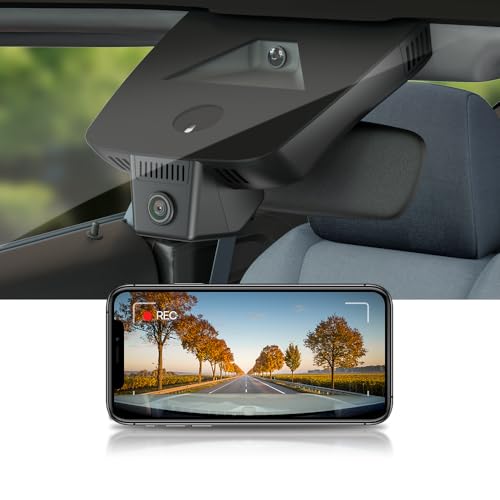
FITCAMX HD2-D5300 4K Dash Cam Suitable – Sleek Factory Look
This camera replaces your existing cover, so it looks like it came from the factory. Most people want something clean that does not dangle wires across the dash. You just snap it into place, and the internal trim pieces keep everything hidden away, which makes for a very tidy setup.
The video quality hits 4K, so you can see license plates if something happens on the road. It uses your car’s existing power, which is nice because you won’t need to mess with extra fuses. A tiny chip stores the files, and it loops automatically when the space gets full.
Installation takes about twenty minutes, even if you are not a mechanic. You just need a small tool to pop off the plastic housing near the mirror. Once you lock it in, the unit stays solid while you drive, and it does not vibrate when you hit a bumpy road.
Pros
- ✔︎Looks like original equipment
- ✔︎Hidden wiring setup
- ✔︎High 4K video resolution
- ✔︎Simple installation process
- ✔︎Uses factory power source
Cons
- ✘No rear camera included
- ✘App interface feels basic
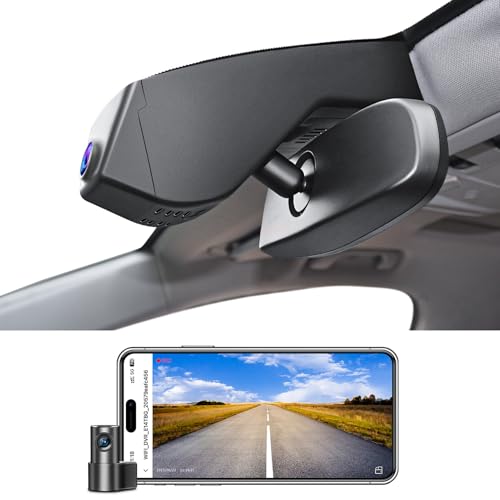
mangoal MG-014D Front 4K & Rear 1080p Dash Cam – Dual Channel Coverage
You get both a front and rear lens with this kit, which helps if someone bumps your back bumper. The front unit records in 4K detail, so signs are easy to read in the footage. Most rear cameras are grainy, but this 1080p lens captures enough detail for insurance needs.
Running the cable to the back of an Acadia takes patience, but it provides peace of mind. You should tuck the wire under the headliner to keep it out of sight. The kit comes with a long enough cord, and the sticky pads hold the lenses in place even in heat.
Night vision performance is decent because of the sensor quality inside the unit. It brightens up dark streets, so you can see pedestrians or parked cars clearly. When you park, the system keeps watching if you buy the extra cable, so you feel safer leaving your SUV in public.
Pros
- ✔︎Dual lens for safety
- ✔︎Sharp 4K front video
- ✔︎Long cable for SUVs
- ✔︎Good night vision sensor
- ✔︎Includes parking mode support
Cons
- ✘Sticky pads are permanent
- ✘Setup takes some time
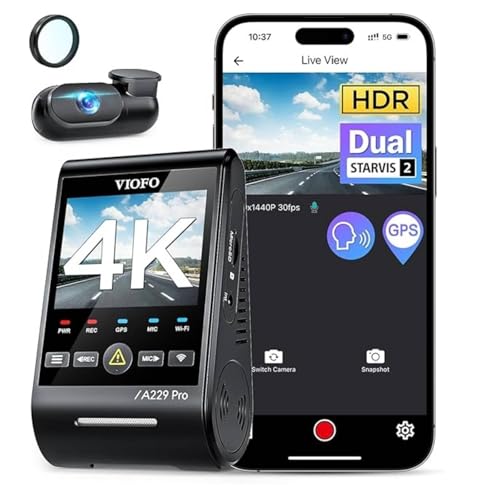
VIOFO A229 Pro 2CH A229 Pro 4K HDR Dash Cam Front and Rear – High Dynamic Range
This camera uses a Sony sensor, which handles bright sun and dark tunnels very well. HDR is important when you drive at dawn or dusk because it prevents the light from washing out the video. You will see more detail on the road than with most budget cameras today.
The screen on the back lets you see what is happening without reaching for your phone. It has a nice size, so you can tilt it to check the angle during your setup. A voice warning tells you if the memory card fails, which is helpful to stay protected.
Connecting your phone through the app makes downloading clips simple after a stressful event. You can grab a quick file for the police or your insurance company right there in the parking lot. The menu system is fast, and the buttons have a firm click when you push them.
Pros
- ✔︎HDR keeps light clear
- ✔︎Fast phone app connection
- ✔︎Sony sensor for detail
- ✔︎Helpful voice status alerts
- ✔︎Easy menu navigation
Cons
- ✘Unit size is large
- ✘Screen can be distracting
TERUNSOUl D016X 4K+4K Dash Cam – Dual Front and Rear Resolution
Recording in 4K at both ends of the car gives you evidence that leaves no questions behind. If an accident occurs, you want to see exactly what happened behind you as well. This unit provides that level of detail, so you never have to guess about the other driver.
The mounting hardware feels solid, so it stays stuck to the glass even on a hot day. You get a steady picture without any shaking, and the lens stays focused on the road. Most cameras drift over time, but this one holds its position well after you set it up.
Reviewing your footage is easy because both files save to one card. You do not need to hunt for different folders, which saves time when you are in a rush. The design is simple, and it sits low enough on the glass to avoid annoying your eyes while driving.
Pros
- ✔︎4K resolution on both
- ✔︎Stable mounting bracket
- ✔︎Single card file storage
- ✔︎Low profile on glass
- ✔︎Reliable lens focus
Cons
- ✘Runs hot when recording
- ✘Large file sizes
pelsee S1 Pro S1 Pro Native Dual 4K Dash Cam Front and Rear – Mirror Display Setup
You can replace your bulky rearview mirror with this digital screen, which gives you a clear view behind the car. It uses a wide lens, so you see much more than a standard mirror allows. The display is very bright, so you can see it easily in direct sunlight.
The front lens attaches to the mirror unit, so your windshield stays clean and free of clutter. You get a second camera for the back that sends a live feed to the mirror. It feels like a modern feature, and it makes backing up into tight parking spots easier.
Installation involves running cables through the car pillars, which takes some effort for a beginner. Once the wires are hidden, the clean look is worth the work. The software is intuitive, so you can swipe the mirror screen to change the view from the front or the back.
Pros
- ✔︎Clear digital mirror view
- ✔︎Wide field of vision
- ✔︎Bright screen for daytime
- ✔︎Simple swipe touch controls
- ✔︎Keeps windshield very clean
Cons
- ✘Requires wiring work
- ✘Mirror adds extra weight
shenghuo 1 4K+1080P*3 FHD Dash Cam Front and Rear – Triple Lens System
Having three cameras means you watch the front, the back, and the inside of your car all at once. This setup is great if you use your Acadia for driving passengers around. You capture everything inside the cabin, and it provides a full record of every single trip.
The main unit holds onto the dash well, and the smaller cameras hide behind the seats. You do not have to worry about missing something in the side lanes because the front lens is very wide. It records enough of the street to show what happens in traffic jams.
Storage management is smart because it deletes the oldest files first. You never run out of room when you need to record something new. The setup process is slightly more complex with three lenses, but it works fine once you have the wires routed through your car interior.
Pros
- ✔︎Three separate camera views
- ✔︎Useful for passenger safety
- ✔︎Wide front angle lens
- ✔︎Automatic file loop recording
- ✔︎Simple storage management
Cons
- ✘Three cables to hide
- ✘Setup is quite long
Quick Comparison
| # | Product Name | Standout Feature | Best For | Our Rating |
|---|---|---|---|---|
| 1 | FITCAMX HD2-D5300 | Hidden factory design | Sleek look | 9.5 |
| 2 | mangoal MG-014D | Long rear cable | Big SUVs | 8.8 |
| 3 | VIOFO A229 Pro | Sony HDR sensor | Night driving | 9.2 |
| 4 | TERUNSOUl D016X | Dual 4K lenses | High detail | 8.5 |
| 5 | pelsee S1 Pro | Mirror display | Better visibility | 8.9 |
| 6 | shenghuo 1 | Triple camera setup | Ride sharing | 8.2 |
What to Look for Before You Buy Best Dash Cam for Gmc Acadia
Video Resolution
You should look for at least 4K resolution on the front lens to see details like plates. Lower quality makes it hard to identify cars in a hit and run. A clear picture helps your insurance claim move faster, and it gives you peace of mind on the road.
Resolution matters most when you are driving at night or in the rain. Sharp pixels allow you to see through the glare, which is why 4K is better than 1080p. If you pick a cheaper camera, you might struggle to read signs during a cloudy winter day in traffic.
Field of View
A wide lens captures more of the road, including the lanes to your left and right. Most cameras offer at least 140 degrees of vision, which is standard for a mid-size SUV. You want a lens that covers the whole windshield area, so no event happens outside the frame.
Distortion can happen if the lens is too wide, so watch for that in reviews. A curved image at the edges is normal, but it should not blur your view of the road. Test the angle once you mount it, so you are sure the center covers your path.
Memory Storage
Loop recording keeps the camera going without you needing to press any buttons to save space. Once the card is full, the system wipes the oldest file, which keeps the process simple. Most drivers need at least 128GB of space to hold a few days of steady driving.
Check if your unit supports a high-endurance memory card meant for cameras. Regular cards can fail because they rewrite data too often, and you do not want that during an accident. A 256GB card is a safe bet for long road trips where you want to keep the footage.
Power Options
Using the cigarette lighter port is the easiest way to power your camera. If you want a clean look, look for hardwire kits that connect to the fuse box. These stay hidden under your dash, and they keep the port free for your phone charger or other gear.
Always consider if you need a parking mode to record when the engine is off. Some kits have a battery monitor that stops the camera before it drains your car. You should check the manual to see how many volts it needs to keep running while you shop.
Mounting Method
Sticky adhesive pads are much more stable than suction cups, especially in extreme heat. They hold the camera tight to the windshield, which prevents shaking and blurry video files. You should clean the glass with alcohol before you stick the mount on, so it stays there for years.
Suction cups are good if you move the camera between different cars often. They fail more easily when the weather gets very hot or very cold. Most high-quality cameras now come with strong tape that is meant to last, so look for that on the product box.
Smart Connectivity
Connecting to your phone through Wi-Fi helps you adjust settings without clicking tiny buttons. You can see a live preview on your screen to make sure the camera is pointed at the road. It saves you from having to pull the card out to check a file.
Look for a camera that supports fast downloading, because 4K files take a lot of time to move. A simple app makes it easy to save a clip to your phone. Check the app ratings before you buy, because bad software makes a good camera feel frustrating to use.
- Get 4K resolution for better detail
- Use a wide lens for side coverage
- Buy high-endurance cards for long storage
- Pick hardwire kits for clean installs
- Choose sticky mounts for better stability
- Use Wi-Fi apps to check footage
Final Thoughts
I hope you find a model that fits your Acadia perfectly. Choosing the best dash cam for gmc acadia often comes down to how much wiring work you want to do. If you want a simple look, the factory-style units are the way to go. Otherwise, dual-channel kits offer the best evidence for your peace of mind. Take your time, and enjoy the safety of having a digital witness on your drives.
Frequently Asked Questions
Is It Hard to Hide the Wires in an Acadia?
It is not difficult, as you can tuck cables under the headliner or behind the plastic pillars. Most installs take about thirty minutes with a plastic pry tool.
Can I Install This on My Own?
Yes, you can do it easily. Most kits come with everything you need, and you only need basic tools to connect the power or hide the extra cables.
Do I Need a Special Memory Card?
Yes, you need a high-endurance microSD card. These are built to handle constant writing, and a 128GB card holds about 15 hours of 4K video footage.
Is It Safe to Leave the Camera in the Car?
It is safe for the car, but direct sun can heat up the unit. Most cameras are made for these temperatures, and they should handle 120-degree heat.
Can I See the Video on My Phone?
Most modern cameras connect via Wi-Fi. You can open the app on your phone and download your files in about 2 minutes per clip.
Do I Need a Rear Camera?
It is a good idea for an SUV. A rear lens captures tailgaters or accidents, and it gives you a complete record of what happened behind you.
Is the Value Worth the Cost?
Yes, it is cheap compared to an insurance deductible. One saved claim after a minor accident makes the price of a good camera pay for itself.
Does It Record When I Park?
Some models do, if you use a hardwire kit. This keeps the camera on to watch for bumps while you are away from your vehicle.
Do I Need to Clean the Lens?
You should wipe it once a month. Dust or smudges can make the 4K video look blurry, so a quick cloth swipe keeps the quality sharp.
Is the Warranty Long Enough?
Most brands offer a 1-year warranty. You should register your unit online after you buy it to make sure you are covered for any faults.