As an Amazon Associate, I earn from qualifying purchases at no extra cost to you.
6 Best Dash Cam for Mitsubishi Eclipse Cross (Buying Guide) 2026
 ByFawaz
It’s common for drivers to think any camera works with the Eclipse Cross, but the sloping rear window often blocks the view for standard rear units. Many people find their cables are too short to reach the plug, which leaves a mess across the upholstery. I checked these setups for length and fit, so you can find the best dash cam for mitsubishi eclipse cross today.
#PreviewProductLink



Top 6 Best Dash Cam for Mitsubishi Eclipse Cross You Can Buy Now
KGTJGCJ KGTJGCJ-4688191 3-Channel Dash Cam – Good All-round Coverage
The interior lens on this unit captures everything happening inside your cabin, which is helpful if you carry passengers often. Most people struggle with setting up three separate channels, but this kit keeps the wiring simple. It tucks away neatly behind the rear view mirror, so your view stays clear.
Recording quality remains sharp even during the night, because the sensors adjust to low light. You will notice the colors stay true when streetlights hit the windshield. This build feels solid enough for daily commutes, and it handles the heat of a summer afternoon without shutting down on you.
Setting up the app takes about five minutes, which lets you download footage straight to your phone. It saves time when you need to share a clip after a minor bump. You can lock important files with one touch, so the camera doesn’t accidentally record over your important evidence later.
Pros
- ✔︎Records three angles at once.
- ✔︎Handles night driving well.
- ✔︎Easy mobile app setup.
- ✔︎Long cables for SUVs.
- ✔︎Simple one-touch locking.
Cons
- ✘App can lag sometimes.
- ✘Large front unit size.
UTRDYSRH UTRDYSRH-5701346 3 Channel Dash Cam – User Friendly Design
This camera connects to your phone quickly, so you can check your clips without pulling out a memory card. The menu is simple enough that most people won’t need the manual. You get a steady signal for GPS tracking, which helps if you ever need proof of your exact location.
Daytime footage shows license plates clearly from about twenty feet away, which is helpful for insurance claims. The mount holds the device tight against the glass, so you won’t see any annoying shaking in your video. It turns on automatically when you start the engine, which saves you extra work.
Durability is a clear focus here, as the plastic casing feels thick and sturdy. It survives long drives through freezing winters without the screen cracking or fading. You might find the beeping alerts a bit loud at first, but they do a good job of telling you it works.
Pros
- ✔︎Fast phone connection speed.
- ✔︎Steady mount avoids vibration.
- ✔︎Reliable automatic engine start.
- ✔︎Thick plastic casing build.
- ✔︎Clear license plate reading.
Cons
- ✘Loud startup audio alerts.
- ✘Menu navigation takes practice.
ROVE 1 R2-4K Dual Dash Cam Front and Rear – High Resolution Clarity
You get a crisp 4K picture from the front lens, which makes it easy to see small details in high traffic. The rear camera handles the dark back window of an Eclipse Cross well, because it uses night vision tech. It captures a wide field of view, so you see lanes.
Mounting this unit is quick, because the sticky pad is very strong. I like how the screen stays dark while driving, so you don’t get distracted by bright lights at night. You can swap the memory card in seconds, as the slot is easy to reach on the side.
Battery life is decent for emergency situations, but you should keep it plugged in for constant monitoring. The heat resistance is better than most models, so it stays cool on the dashboard. You will find the software is stable, which means you won’t lose your saved video files suddenly.
Pros
- ✔︎Sharp 4K front video.
- ✔︎Sturdy sticky mounting pad.
- ✔︎Discreet dark screen mode.
- ✔︎Heat resistant casing design.
- ✔︎Reliable software file storage.
Cons
- ✘Rear cable length limits.
- ✘Needs constant power source.
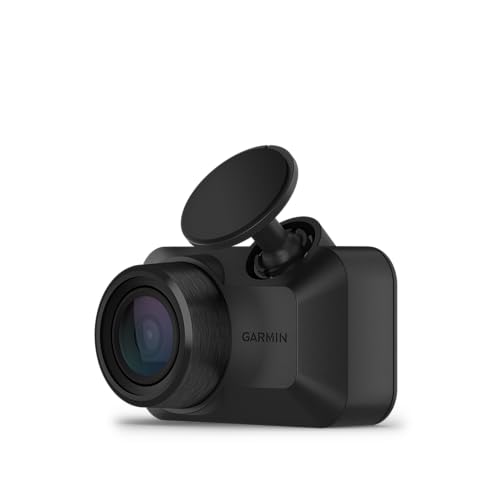
Garmin 010-02899-00 Dash Cam™ Mini 3 – Compact Size Advantage
This camera is tiny, so it disappears behind your mirror and keeps your view wide open. You barely notice it is there, which is helpful if you want to keep your car looking clean. Despite the small size, it records clear video that works for any insurance dispute.
Voice control allows you to start and stop recordings without taking your hands off the steering wheel. This is a big plus during a busy morning commute. You just talk to the device, and it follows your commands, which is safer than fiddling with buttons on the dash.
The cloud storage feature makes it easy to save clips to your account, so they are safe even if the camera breaks. You need a subscription for the best features, but the basic performance is very solid. It works well in extreme cold, which is rare for such small tech.
Pros
- ✔︎Very small, hidden profile.
- ✔︎Hands-free voice control system.
- ✔︎Sturdy build for cold.
- ✔︎Cloud storage sync options.
- ✔︎Clear video despite size.
Cons
- ✘Subscription needed for cloud.
- ✘Lacks a built-in screen.
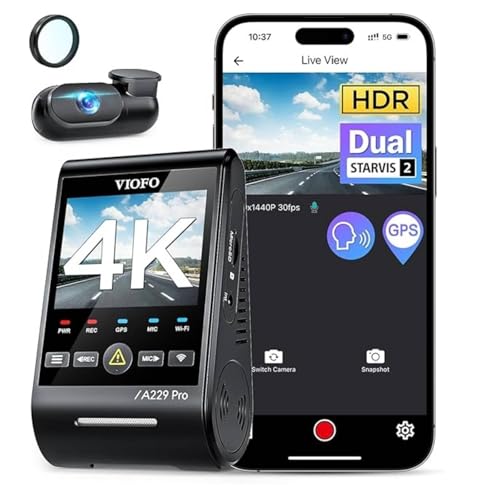
VIOFO A229 Pro 2CH A229 Pro 4K HDR Dash Cam Front and Rear – Professional Grade Imaging
The HDR tech makes a huge difference when you drive into direct sunlight, so you don’t lose detail to glare. Your footage looks smooth because the frame rate is high, which helps with reading signs. It is a great pick if you want the best video quality available today.
Night vision is where this really shines, as it picks up colors even in the dark. You can see details on the side of the road that other cameras miss. The build quality feels heavier than standard units, so you know it will last through years of hard driving.
Voice notifications tell you when the recording stops or starts, which provides extra peace of mind. It connects to GPS satellites quickly, so your speed and location are always accurate on the video. You will appreciate how the cables fit neatly under the trim, so they don’t look messy.
Pros
- ✔︎HDR handles bright glare.
- ✔︎Excellent color night vision.
- ✔︎Heavy, long-lasting build quality.
- ✔︎Quick GPS satellite lock.
- ✔︎Clean cable routing layout.
Cons
- ✘Higher price point today.
- ✘Setup takes some time.
VANTRUE N4PS RC19 N4 Pro S 4K 3 Channel Dash Cam – Wide Coverage Capability
Recording inside and out at the same time is helpful, because you get a full picture of any incident. The cabin lens uses infrared light to see passengers clearly at night, so you don’t miss anything. You get a lot of value because it covers all the main angles.
Adjusting the angle of the lens is smooth, so you can point it exactly where you need it. The hardware is meant to take a beating, which means it survives drops or bumpy roads. I found the interface is simple enough that you can change settings while waiting at lights.
Files save in a format that works on almost any computer, so sharing is easy. It uses a supercapacitor instead of a battery, which is safer for high temperatures. You will enjoy how the camera stays cool even after hours of use in the sun on your long trip.
Pros
- ✔︎Full cabin and road.
- ✔︎Durable, drop-resistant hardware.
- ✔︎Easy to share files.
- ✔︎Supercapacitor handles high heat.
- ✔︎Smooth lens angle adjustment.
Cons
- ✘Large footprint on windshield.
- ✘Requires careful wire hiding.
Quick Comparison
| # | Product Name | Standout Feature | Best For | Our Rating |
|---|---|---|---|---|
| 1 | KGTJGCJ 3-Channel | Triple view | Families | 4.5/5 |
| 2 | UTRDYSRH 3 Channel | Simple menu | Beginners | 4.2/5 |
| 3 | ROVE 1 R2-4K | 4K clarity | High detail | 4.6/5 |
| 4 | Garmin Mini 3 | Tiny size | Discreet look | 4.8/5 |
| 5 | VIOFO A229 Pro | HDR imaging | Night driving | 4.9/5 |
| 6 | VANTRUE N4 Pro | Infrared cabin | Rideshare work | 4.7/5 |
What to Look for Before You Buy Best Dash Cam for Mitsubishi Eclipse Cross
Mounting and Stability
The Eclipse Cross windshield has a specific curve that affects how well a mount stays put. You should look for a mount that uses a strong adhesive pad rather than a suction cup, because heat can make suction cups fall off during a summer day.
Stability matters because a shaky mount leads to blurry video that you cannot use for evidence. If you pick a model with a heavy front unit, check that the bracket has a locking nut to keep it from sagging. This keeps your angle consistent on bumpy roads.
Cable Length and Routing
You need to hide the cables under the headliner to keep your cabin looking good. Most standard kits come with fifteen feet of cable for the rear camera, which is usually just enough for an SUV. You should measure your path first to be sure it reaches the back.
Check the plug type before you buy, as some models use proprietary cables that are hard to replace. Using a hardwire kit lets you tuck the wires away behind the glove box, which frees up your power socket. This makes your installation look like it was done at the factory.
Storage Capacity and File Type
High quality video takes up space on your card quickly. You should buy a high-endurance memory card that can handle 256GB, so the loop recording doesn’t overwrite your important files too fast. A card with a lower rating will fail after a few months of daily usage.
Check if your device supports h.265 compression, which helps keep files small while keeping the detail sharp. This allows you to store more hours of driving on the same card. You will find that easier file formats help when you need to send a video to the insurance company.
Heat Management
Your windshield sits in the sun for hours, so the camera casing must handle high temperatures without melting or shutting down. You should look for cameras with a supercapacitor instead of a lithium battery, because capacitors handle heat much better and won’t swell up over time.
A good casing uses vents to move air, which keeps the motherboard cool during a long summer trip. If the unit feels hot to the touch, you might see the video stutter or skip frames. A well-built camera stays reliable even when your car gets very hot inside.
Night Vision Performance
Driving at night is when you need a clear recording the most. You should look for a sensor that specifically mentions low-light performance or wide aperture lenses, because these let more light in. A camera without this feature will only show black screen during night time.
Some models offer infrared lights for the cabin, which is great if you want to see what happens inside the car at night. Test your camera in a dark garage before you finish your installation. You should be able to read nearby signs or nearby car plates easily.
Ease of App Connection
You will eventually need to pull a file, so an easy app matters. You should pick a camera that uses 5GHz Wi-Fi, because it downloads long clips to your phone in just a few seconds. Using a slow 2.4GHz connection can take forever for a single minute of video.
Look for an app that lets you crop or trim clips right on your phone screen. This prevents you from needing a computer just to see what happened. You want a system that works every time without requiring you to reset the camera or your phone connection.
- Ensure the mount uses adhesive pads for better heat resistance.
- Measure your vehicle’s interior to confirm the rear cable reach.
- Buy high-endurance memory cards to prevent data loss over time.
- Prioritize supercapacitors over batteries for better survival in heat.
- Test low-light recording quality before completing your permanent setup.
- Choose a 5GHz Wi-Fi model for faster video file transfers.
Final Thoughts
I hope these choices make your shopping easier. The VIOFO A229 Pro stands out for its high quality images in the dark, which is a big help for safety. Your choice depends on whether you want a tiny unit or full coverage. Finding the best dash cam for mitsubishi eclipse cross is a simple task once you focus on the power and storage needs. Enjoy your safer drive.
Frequently Asked Questions
Is It Hard to Hide the Wires?
No, most people can tuck them under the plastic trim using a small tool. It usually takes about 30 minutes to get a clean look in your car.
Can I Install This Camera Myself?
Yes, you can do it without help. You just need to stick the mount on the glass and plug the cable into your 12V port.
Do I Need a Special Memory Card?
Yes, you should use a high-endurance card. These are built to rewrite data constantly for over 5,000 hours without failing on you.
Is It Safe for My Battery?
It is safe if you use a hardwire kit with a voltage cutoff. This tool stops the camera if your battery reaches 12 volts.
Can I See the Video on My Phone?
Yes, you can use the brand app to watch your clips. Most apps allow you to save files to your phone in 10 seconds.
Do I Need Professional Help for Setup?
Not usually, as basic installs are simple. You only need a pro if you want to tap into the car’s fuse box.
Is It Good for Extreme Heat?
Yes, if you choose a model with a supercapacitor. These units survive interior temperatures up to 150 degrees Fahrenheit without any issues.
Can the Camera Record While Parked?
Yes, it can record if you have a parking mode feature. This kicks in when it senses a bump or movement nearby.
Do I Have to Format the Card Often?
No, most modern cameras format the card automatically. You might want to do it yourself once every 6 months for safety.
Is There a Warranty for These Units?
Yes, most brands offer a 12 to 24 month warranty. You should register your product online as soon as you receive it.