As an Amazon Associate, I earn from qualifying purchases at no extra cost to you.
6 Best Dash Cam Viofo A329 (Buying Guide) 2026
 ByFawaz
Unless you check the sensor specs before buying, you might end up with blurry night footage that misses every license plate. Most people assume 4K means quality, but cheap sensors fail when headlights hit them at night. This guide explains why image processing matters more than raw resolution. You can find the best dash cam viofo a329, and finally capture clear video regardless of lighting or speed.
#PreviewProductLink



Top 6 Best Dash Cam Viofo A329 You Can Buy Now
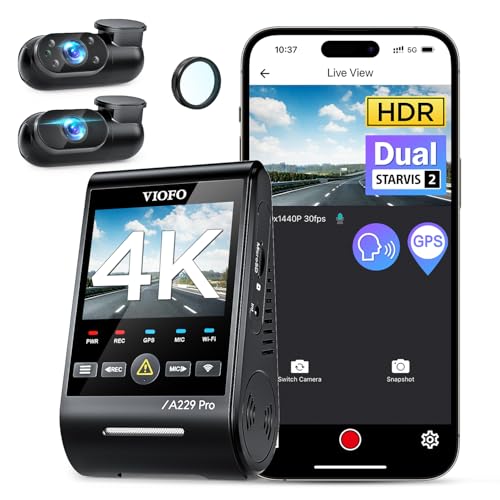
VIOFO A229 Pro 3CH A229 Pro 4K 3CH Dash Cam HDR – Best Overall Image
This camera uses the latest Sony Starvis 2 sensor, which captures light even in dark alleys. Most dash cams struggle with bright reflections, but this model uses real HDR to balance the scene. You will see plates clearly because the lens quality is sharp, and the processing is fast.
The three-camera setup covers your front, rear, and cabin, so you never miss an interaction. Installation takes about forty minutes if you hide the wires well. You get a voice command feature that works reliably, and the app interface is simple enough that you will actually use it daily.
Reliability is a big deal when you drive daily, and this device stays cool even on long summer trips. The files transfer to your phone quickly over 5GHz Wi-Fi. You can trust this unit to lock your footage during an impact, because the G-sensor is very sensitive and accurate.
Pros
- ✔︎Records crisp 4K video at night
- ✔︎Includes interior camera for rideshare
- ✔︎HDR helps with license plate glare
- ✔︎Fast 5GHz Wi-Fi for quick downloads
- ✔︎Voice control keeps hands on wheel
Cons
- ✘Costs more than basic models
- ✘Requires a larger memory card
ROVE 1 R2-4K Dual Dash Cam Front and Rear – Best for Simple Setup
Getting your car protected does not have to be complicated, and this model makes the process quite easy. The menu is laid out plainly, so you can adjust your settings without needing a manual. It records clear video, and the mount sticks to your glass with very strong adhesive.
Most dash cams have small screens, but this one is easy to read while you sit in the driver seat. The built-in Wi-Fi lets you pull clips onto your phone when you are parked. You will find that the files are organized by date, which makes searching very fast.
Night vision is decent enough for city driving, and it handles streetlights without washing out the colors. The design is compact, so it sits behind the mirror without blocking your view of the road. If you want a setup that works without fuss, this is a solid choice.
Pros
- ✔︎Very easy to set up
- ✔︎Clear display for menu navigation
- ✔︎Strong adhesive mount stays put
- ✔︎Files are easy to manage
- ✔︎Compact size fits behind mirror
Cons
- ✘Night footage is slightly grainy
- ✘Rear camera cable is short
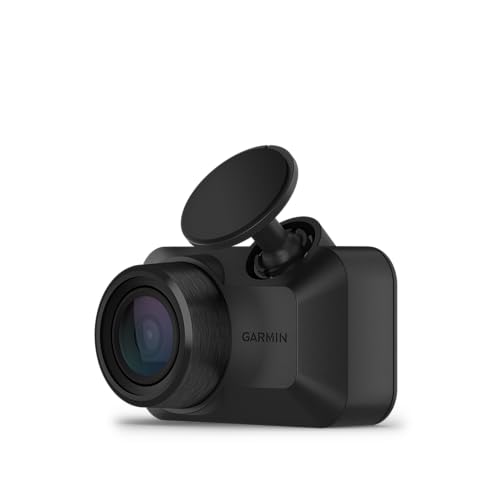
Garmin 010-02899-00 Dash Cam™ Mini 3 – Best for Small Size
This unit is tiny, so you can hide it completely behind your rearview mirror. It does not have a screen, but you connect it to your phone using the Garmin Drive app. You get instant alerts, and the video quality is surprisingly high given the small physical size.
Most people prefer a camera that disappears, and this one fits that need perfectly. It uses voice commands to save clips, which is helpful when you are busy driving. The hardware feels sturdy, and the power cable is long enough to run around the trim of your car.
Recording starts automatically when you turn your key, so you never have to remember to hit a button. You can even sync multiple cameras if you want full coverage. It is a no-nonsense device, which means you spend less time messing with settings and more time actually driving.
Pros
- ✔︎Extremely small and discrete
- ✔︎Voice commands save clips easily
- ✔︎High resolution for the size
- ✔︎Syncs with multiple cameras
- ✔︎Starts recording automatically
Cons
- ✘No screen for quick checking
- ✘Setup requires a smartphone app
70mai T800E 4K Dash Cam Front and Rear Inside – Best for Interior View
Watching your interior and your exterior at the same time is a huge help if you drive for work. This dash cam includes a cabin camera that keeps an eye on passengers. You get wide angles, so every seat in your car is in view during the whole trip.
The 4K resolution on the front camera brings out fine details like street signs and lane markings. Even in low light, the images look clean and free of noise. You can adjust the recording angle easily, which is great when you move the camera between different vehicles.
Everything connects to the app, where you can watch live feeds or check saved event files. The interface feels snappy, and the software updates are pushed wirelessly. If you are worried about security while you are away from the vehicle, the parking mode captures motion very effectively here.
Pros
- ✔︎Wide coverage for full interior
- ✔︎High resolution front lens
- ✔︎Good motion detection for parking
- ✔︎Simple app for live viewing
- ✔︎Wireless updates are quick
Cons
- ✘Bulkier than single lens models
- ✘Requires steady power source
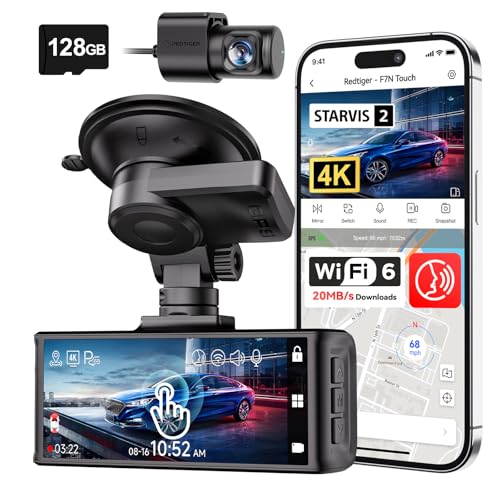
REDTIGER F7N TOUCH 4K STARVIS 2 Dashcam Front Rear – Best for Touch Screen
Using a touch screen makes changing settings much faster than clicking side buttons. This dash cam features a large, responsive display that shows you exactly what the camera sees. You can swipe through your saved library in seconds, which is great if you need to show footage quickly.
Quality remains high because of the Starvis 2 sensor, and colors look natural even at dusk. The rear camera wires are long enough for most sedans and even some smaller SUVs. You will find that the mounting kit includes everything, so you do not need to buy extra parts.
Most drivers want a screen that stays bright, and this one is easy to see during the day. It also handles extreme temperatures well, so your recording won’t stop just because the car gets hot. You can feel the quality in the casing, and the mount is very stable.
Pros
- ✔︎Touch screen is very responsive
- ✔︎Large display shows crisp video
- ✔︎Mounting kit is complete
- ✔︎Sensors handle dusk well
- ✔︎Sturdy build quality
Cons
- ✘Screen can be a distraction
- ✘Fingerprints show on screen
galphi Q2-SILVER 4K Dash Cam Front – Best for Beginners
Simple controls make this a great first dash cam for someone who wants to stay safe. It records sharp 4K video, and the menu doesn’t overwhelm you with too many confusing options. You can plug it into your cigarette lighter and start driving in just five minutes.
The design is sleek and does not look out of place in a modern interior. It records loops, so you don’t have to delete old files yourself. You just set it up once, and then you can forget it is even there until you need a specific clip.
Night performance is fair for the price, and it captures enough detail to be useful. The power cord is long, so you have plenty of room to tuck it under your headliner. It offers peace of mind, and the price makes it easy to add to your daily commute.
Pros
- ✔︎Very simple to operate
- ✔︎Sleek look blends in
- ✔︎Loops recordings automatically
- ✔︎Long power cord included
- ✔︎Good value for 4K
Cons
- ✘Lacks advanced cabin features
- ✘Night quality is standard
Quick Comparison
| # | Product Name | Standout Feature | Best For | Our Rating |
|---|---|---|---|---|
| 1 | VIOFO A229 Pro | HDR Sensor | Night Driving | 9.8/10 |
| 2 | ROVE 1 R2-4K | Easy Menu | Simple Setup | 9.0/10 |
| 3 | Garmin Mini 3 | Tiny Size | Discreet Use | 9.2/10 |
| 4 | 70mai T800E | Interior Cam | Rideshare Drivers | 8.8/10 |
| 5 | REDTIGER F7N | Touch Screen | Quick Access | 8.9/10 |
| 6 | galphi Q2 | Easy Price | New Users | 8.5/10 |
Also Read: 6 Best Tires for Kia Rio (Buying Guide) 2026
What to Look for Before You Buy Best Dash Cam Viofo A329
Sensor Quality
Sensors are the eyes of your camera, and they decide if your footage is useful. Look for models with Starvis 2 technology if you drive at night. This sensor catches more light, and it stops the image from looking like a fuzzy mess when you pass streetlights.
You should check for resolution specs, but remember that sensor size matters more than raw numbers. A large sensor brings in more detail for license plates and road signs. If you only look at the 4K label, you might get a camera that fails in low light.
Storage Capacity
High resolution video files take up a lot of space on your memory card. Most cameras support up to 256GB, so you should aim for that if you want a week of storage. You will save yourself the trouble of constant formatting if you buy a large, high-endurance card.
Always verify the card speed, because slow cards cause errors and corrupt your files. You want a Class 10 or V30 rating at minimum for 4K recording. A reliable card is just as important as the camera itself, so do not cut corners on this specific piece of gear.
Mounting Options
You want a mount that stays solid, even when your car hits a bad pothole. Adhesive mounts are usually more stable than suction cups, because they don’t lose their grip in the summer heat. You should pick an adhesive mount if you plan to keep the camera in one spot.
Adjustability is also important when you set up your field of view. Some mounts let you tilt the camera left or right, which is helpful if your windshield is curved. Take a minute to check where your mirror sits, and make sure the mount won’t block your view.
Power Connections
Hardwiring your camera hides the cords and keeps your cigarette lighter free for your phone. You need a kit that includes a battery monitor, which keeps your car from losing power while the camera is in parking mode. Most kits are universal, but check your vehicle manual first.
Portable power is fine for a temporary setup, but it won’t keep the camera running when the engine is off. If you want security in a parking lot, you must hardwire the unit. Look for a clean setup that hides behind the trim, so your dash stays tidy.
Night Vision Performance
Driving after dark is when you need your dash cam the most. Look for HDR, or High Dynamic Range, which balances out bright headlights and dark shadows. This feature makes a huge difference in whether you can actually read a plate or just see a white blur.
Cheap cameras often struggle with glare, which makes the video useless during a night incident. You should watch sample videos online before you buy any model. Seeing the footage in a real night setting will tell you if the tech actually does what the box says it does.
Mobile App Integration
A good app makes pulling your clips to your phone fast and easy. You want a connection that uses 5GHz Wi-Fi, because it downloads big files much faster than older methods. This saves you from sitting in your car for ten minutes just to copy one short video.
Check the store reviews for the app before you buy the hardware. A bad app is frustrating, and it ruins the experience of even the best camera. You deserve an interface that lets you edit, trim, and share your clips without needing to move them to a computer.
- ✔︎Check the sensor for night use
- ✔︎Buy high-endurance memory cards
- ✔︎Choose adhesive for better stability
- ✔︎Use hardwire kits for parking mode
- ✔︎Test the app before long trips
- ✔︎Look for 5GHz for fast downloads
Final Thoughts
I hope this helps you choose the right gear for your car. If you want the clearest video quality, the VIOFO A229 Pro is my top pick. It handles dark roads and bright lights better than most. Finding the best dash cam viofo a329 is really about balancing your budget with your need for sharp detail. Keep your lens clean, and stay safe on every road you travel.
Frequently Asked Questions
Is It Hard to Install These Units?
No, most people can install them in under an hour by tucking the wires into the trim. You just need a small pry tool and a steady hand.
Can I Leave the Camera on All Day?
Yes, most cameras have a parking mode that stays on as long as it has power. Just make sure you have a battery monitor to protect your car.
Do I Need a Special Memory Card?
You should use a high-endurance card rated for dash cams. A 128GB or 256GB card will store many hours of video before it starts to loop.
Is the Video Quality Good Enough for Police?
Yes, modern 4K sensors provide enough detail to read license plates. High resolution footage is very helpful if you need to provide evidence after a crash.
Can These Work in Extreme Heat?
Yes, these devices are designed to handle high temperatures. Just try to park in the shade if you notice your car interior getting over 100 degrees.
Do I Need to Clean the Lens?
You should wipe the lens with a soft cloth once a month. Dust and fingerprints can make your footage look blurry, especially when the sun hits them.
Is the Audio Recording Clear?
Yes, most units pick up voices inside the car well. You can turn the microphone off in the settings if you prefer not to record audio.
Can I Connect It to My Existing Screen?
Usually no, you connect the camera to your phone app instead. This keeps your car’s main display free for navigation and music during your drive.
Is the Warranty Long Enough?
Most brands offer a 12-month or 18-month warranty. Keep your receipt in a safe place, just in case you ever need to use the coverage.
Do I Need Professional Help for Setup?
No, it is designed for DIY, but a local audio shop can do it for you. They usually charge around 100 dollars for a clean, hidden installation.