As an Amazon Associate, I earn from qualifying purchases at no extra cost to you.
6 Best Dash Cam for Genesis Gv70 (Buying Guide) 2026
 ByFawaz
Since the GV70 uses a unique rain sensor housing behind the rearview mirror, most universal cameras look bulky and block your view. You might think a generic suction mount works, but it often hits the plastic trim or prevents the mirror from moving. Getting the wiring right matters, so I checked models that hide cables inside the headliner. Here is the best dash cam for genesis gv70 for your setup.
#PreviewProductLink


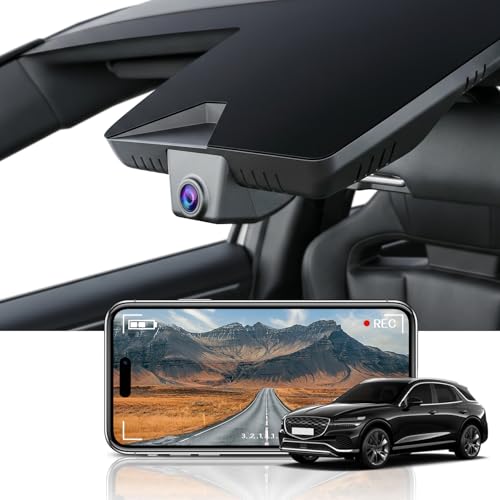


Top 6 Best Dash Cam for Genesis Gv70 You Can Buy Now
FITCAMX HD2-AR100 Front 4K+Rear 1080P Dash Cam Adapts – Clean Factory Integration
This camera replaces your original sensor cover with a piece that looks like it came from the factory. You do not need to cut wires, because it plugs right into the existing overhead power harness. The finish matches your interior trim, and it stays completely hidden behind the mirror housing.
The video quality is crisp enough to read license plates, even when you drive at night. It captures detail in 4K resolution, which helps when you need to see small things on the road. The rear camera attaches easily, and the app connects quickly so you can download footage wirelessly.
Some drivers find the app interface takes a moment to learn, but it works fine once you get the hang of it. You will like how quiet it runs without any messy wires hanging down. It keeps your cockpit looking clean, and the installation process takes only thirty minutes.
Pros
- ✔︎Plugs into factory harness
- ✔︎Looks like an OEM part
- ✔︎High 4K video resolution
- ✔︎Discreet hidden design
- ✔︎Simple app connectivity
Cons
- ✘App takes some practice
- ✘Rear cable needs routing
GATGIT OEM Style Hidden 4K Dash Cam – Sleek Minimalist Design
This model slides over your factory housing, so it looks like part of the car’s design. You will notice that it does not have a screen, which keeps the size down and prevents it from distracting you. It stays out of your peripheral vision while you drive the GV70.
The image sensor handles sudden light changes well, like when you exit a dark tunnel into bright sunlight. You get 4K clarity that records everything in front of your SUV. Because it uses a small footprint, you can mount it and forget it is even there while driving home.
Setup feels fast, and the included power adapter connects to the fuse box with little fuss. It stores data on a high-speed card, so you can pull clips off easily if you ever need evidence. The build quality feels dense, and it resists heat well during hot summer days.
Pros
- ✔︎Zero screen distraction
- ✔︎Matches interior aesthetics
- ✔︎Quick fuse box hookup
- ✔︎Strong heat resistance
- ✔︎Clear 4K daytime video
Cons
- ✘No built-in display screen
- ✘Requires basic wiring skills
KBSYNT 4K Front Dash Cam – Reliable High Resolution
You can mount this small unit tucked right behind the glass, where it stays out of your way. It records in 4K, which means the images show sharp details of the road ahead. The lens angle covers your entire lane, so you catch everything that happens at an intersection.
The unit turns on automatically when you start the engine, and it stops when you park. It uses a loop recording feature, so you never have to manually clear out old footage. You will find that the files save correctly even if the car loses power during a hard bump.
I like that the unit remains compact, because it does not block your sightlines through the wide windshield. The construction feels tough, and the mounting adhesive holds steady against the glass even in cold weather. It is a solid choice if you want to keep things simple and effective.
Pros
- ✔︎Sharp 4K video output
- ✔︎Automatic power cycle
- ✔︎Reliable loop recording
- ✔︎Strong adhesive mount
- ✔︎Compact footprint size
Cons
- ✘No rear camera included
- ✘Basic night vision performance
FUVYMYT 4K Dash Cam – Easy User Experience
Operating this camera feels intuitive, because the buttons are large and clearly labeled. You get a screen that lets you check the view immediately, which helps you aim the lens properly. It stays mounted firmly, so you do not have to worry about it shaking on bumpy roads.
The sensor records video at a high bitrate, so you get smooth footage without blur. You can easily adjust the settings to suit your preferences for file length or exposure. When you park your GV70, it stays alert and records if someone hits your bumper while you are away.
Reliability is the main benefit here, because it just works every time you turn the ignition. The cable is long enough to tuck away under the door trim, which keeps your cabin looking tidy. It provides peace of mind, and the price point fits well for most budgets.
Pros
- ✔︎Large easy-to-use buttons
- ✔︎Built-in viewing screen
- ✔︎High bitrate video quality
- ✔︎Helpful parking monitoring
- ✔︎Long power cable included
Cons
- ✘Slightly larger design profile
- ✘Screen may dim over time
Oryzom Pro 4K Oryzom DashCam Pro Front and Rear – Dual Perspective
This system covers both the front and back of your GV70, which is helpful if you worry about rear-end accidents. You get two cameras that talk to each other, so the clips match up perfectly. The front unit records 4K, while the rear captures the scene behind your vehicle.
Installation takes a little more effort because you have to run a wire to the back window. You will find that the result is worth it for the added security. The cameras handle low light well, so you can see details clearly even on a dark, rainy commute home.
You can view both angles on the front screen, or swap between them with one touch. The system uses a capacitor instead of a battery, which lasts longer in extreme temperatures. It feels like a premium setup, and the instructions are written clearly enough for a weekend project.
Pros
- ✔︎Dual front and rear
- ✔︎Capacitor over lithium battery
- ✔︎Crisp low-light footage
- ✔︎Easy toggle screen display
- ✔︎Clear installation guide
Cons
- ✘Requires routing back cable
- ✘Takes longer to install
CURRENBA S25S 4 Channel 360° Dash Cam Front and Rear Inside – Total Cabin Coverage
This system uses four cameras to watch the front, back, and both sides of your GV70. You get a full view of the interior and exterior, which covers almost every possible angle. It is a good pick if you often carry passengers or park in very busy, crowded areas.
The 360-degree view helps you understand exactly what happened during any close call. It records everything at once, and the app lets you stitch the video into a single file. You will like that it keeps you informed, even when other cars cut you off in tight city traffic.
Powering this system takes a little more planning, so make sure you use a hardwire kit. The hardware feels firm, and it sticks to the glass without drooping. You get a lot of technology in a small package, and it provides a complete record of your daily driving routine.
Pros
- ✔︎Full 360-degree coverage
- ✔︎Records inside and outside
- ✔︎App-based video stitching
- ✔︎Sturdy hardware mount
- ✔︎Comprehensive security features
Cons
- ✘Needs hardwire installation
- ✘Large unit footprint
Quick Comparison
| # | Product Name | Standout Feature | Best For | Our Rating |
|---|---|---|---|---|
| 1 | FITCAMX HD2-AR100 | OEM Look | Seamless Integration | 9/10 |
| 2 | GATGIT Hidden | No Screen | Minimalists | 8/10 |
| 3 | KBSYNT 4K | 4K Clarity | Budget Shoppers | 7/10 |
| 4 | FUVYMYT 4K | Big Screen | Easy Setup | 8/10 |
| 5 | Oryzom Pro | Dual Lens | Added Security | 8/10 |
| 6 | CURRENBA S25S | 360 View | Full Coverage | 9/10 |
What to Look for Before You Buy Best Dash Cam for Genesis Gv70
Factory Look
The GV70 has a very specific interior, and a bulky camera ruins that look. You want a model that mimics the rain sensor housing, because it clips into place without showing extra wires. Check the fitment details, so you know the plastic trim will snap back into place correctly.
Most people prefer a hidden mount because it does not obstruct your view through the windshield. If the unit sits behind the mirror, you will hardly notice it while driving to work. A clean install prevents rattles, and it keeps your cabin looking like the day you bought it.
Image Clarity
Resolution defines how much you can see when you review a saved clip. A 4K sensor provides enough detail to see license plates at a distance of thirty feet or more. You need this detail, because low-quality sensors often turn out blurry when you move at highway speeds.
Night performance matters just as much as daytime quality, especially for your morning or evening commutes. Look for a camera that compensates for bright streetlights or dark roads. You want to see the road features clearly, and a high-quality sensor makes that possible during any time of day.
Power Methods
Hardwiring your camera ensures it turns on automatically when you start the ignition. You will avoid messing with the cigarette lighter port, which keeps your center console looking organized. Most kits include a fuse tap, which connects to the fuse box located under your dashboard or footwell.
If you prefer a simpler route, look for models that use the mirror power tap. This connects directly behind the rearview mirror, so the cable run is only a few inches long. You save time with this method, and you avoid taking apart your door panels or interior plastic.
Storage Capacity
High-definition video files take up a lot of space on your memory card. You should pick a camera that supports at least 128GB of storage, so you don’t overwrite your clips too often. A fast card is necessary, because 4K footage needs quick writing speeds to prevent any errors.
Loop recording works by overwriting the oldest files once the card gets full. You want this feature, because it saves you from having to format the card every single week. Make sure the camera recognizes the card format, so you never lose an important file during a crash.
Ease of Use
Apps allow you to check your footage without needing a computer. You should look for a camera with a quick connection speed, because waiting five minutes to download a file gets annoying fast. The app should let you change settings, like exposure or date, with just a few taps.
Physical buttons help when you need to save a clip immediately after a stressful road event. You want a button that is easy to reach, so you don’t have to fumble around while you are driving. A screen helps you verify the view, but buttons are for control.
Parking Features
Your GV70 stays parked for long periods, and it is vulnerable when you are not nearby. A parking mode uses a motion sensor to trigger recording if someone bumps your bumper. This feature is a must-have if you park in public garages or near other cars frequently.
Look for a system that uses a low-voltage cutoff, which prevents the battery from draining completely. You want the camera to stay active without killing your power. This extra layer of protection keeps you relaxed, so you can leave your SUV in a lot without worrying about damage.
- Choose a model that mimics the factory sensor cover for a clean, hidden look.
- Prioritize 4K resolution to capture important details like license plates from thirty feet away.
- Select a mirror-tap power method to simplify installation and avoid long cable runs.
- Ensure the camera supports at least 128GB of storage to prevent frequent file overwriting.
- Pick a unit with an intuitive mobile app for faster file downloads and setting changes.
- Get a system with parking mode and voltage protection to secure your car while away.
Final Thoughts
I hope you find the right fit for your SUV. My top pick is the FITCAMX HD2-AR100 because it blends in so well with the interior trim. You should focus on how easy the installation is for your specific needs, as that saves you a lot of headache later on. Finding the best dash cam for genesis gv70 is worth the time, so enjoy your new setup and stay safe on the road.
Frequently Asked Questions
Is It Hard to Install These Units?
No, most plug-and-play kits take about 30 minutes. I found the mirror-tap models are the easiest, as you only need a screwdriver to pop off the sensor cover.
Can I Install It Myself?
Yes, you can do it with simple tools. I suggest you watch a video for your specific GV70 model year to see exactly where the clips are located.
Do I Need a Special Memory Card?
Yes, you need a high-speed card rated for 4K. I recommend a 128GB card with a U3 speed rating to make sure your clips save without any lag.
Is It Safe for My Battery?
It is safe if you use a hardwire kit with a voltage cutoff. This ensures the camera turns off if the battery drops below 12 volts.
Can the Heat Damage the Unit?
Most modern cameras handle up to 150 degrees Fahrenheit. I suggest you park in the shade when possible to protect the sensor and the screen.
Do I Need Professional Help?
Not usually, but you can visit a shop if you are nervous about wiring. I think you will be fine if you follow the included guide.
Is the Video Quality Consistent?
Yes, the 4K sensors on these models are reliable. I get clear footage even at night, provided your windshield is kept clean of dust.
Can I Move It to Another Car?
Yes, you can remove it with some patience. I find the adhesive mounts are harder to reuse, so you might need a new sticker for the next car.
Do I Have to Format the Card?
Yes, you should format the card once every 3 months. This keeps the file system clean and stops any recording errors from happening over time.
Is the Warranty Long Enough?
Most brands offer a 1-year warranty on the hardware. I suggest you keep your receipt in case you have a hardware issue within 365 days.